


At the Build 2025 developer conference, Microsoft announced a new 'Advanced Settings' feature to help users and developers personalize the OS experience.
With 'Advanced' settings, you can customize several features of Windows 11, such as File Explorer and Virtual Machines.
The new 'Advanced' Settings page can be accessed from Settings > System > Advanced. It replaces the 'For developers' tab in the Settings and retains all of the features.

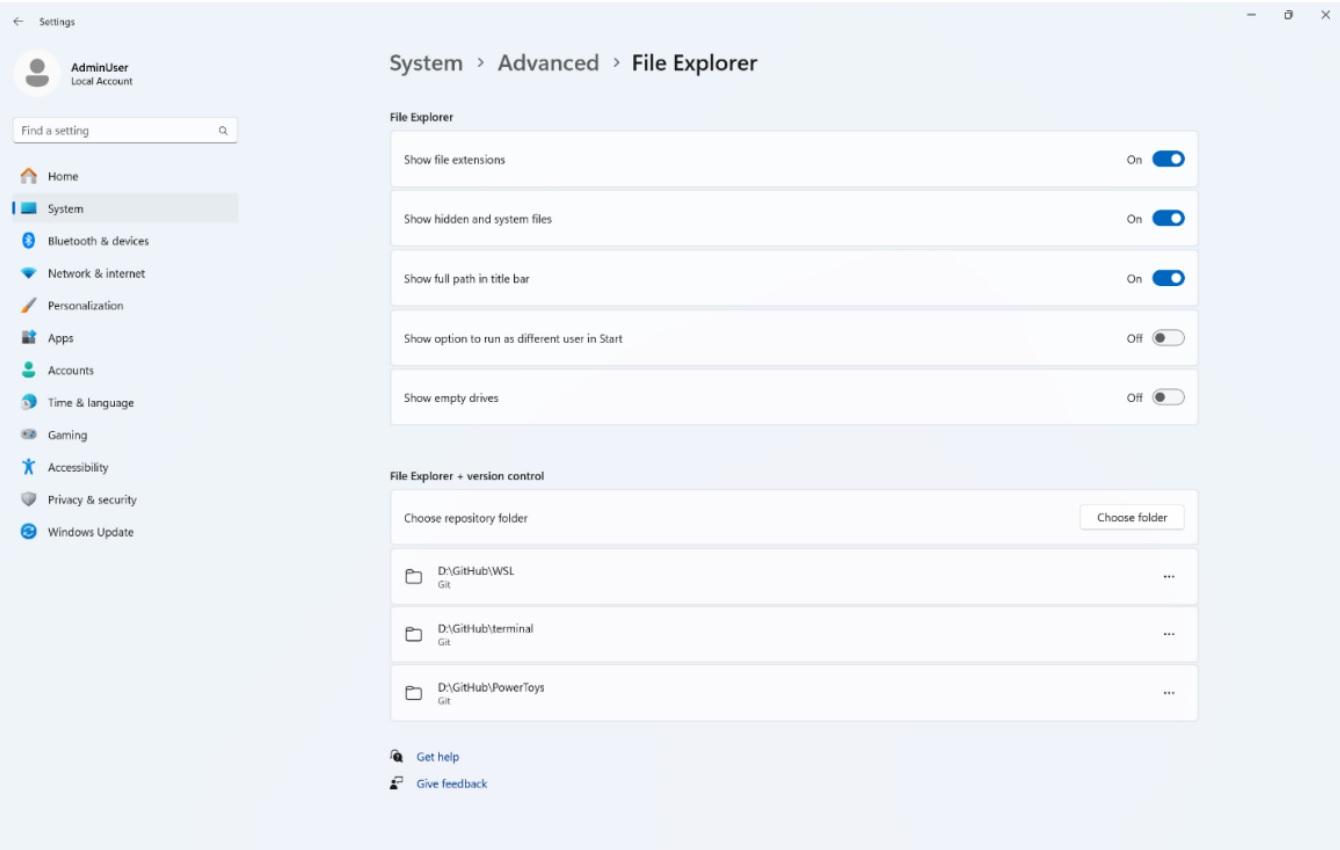
Unlike the old For Developers page, it gives users more control over how files and folders are shown and how version control works. At the top, you can see options like:
- Show file extensions: When turned on, you can see file types like .txt, .jpg, etc. after the file name.
- Show hidden and system files: This shows files that are normally hidden by Windows, like system files.
- Show full path in title bar: This displays the full folder path at the top of File Explorer.
- Show option to run as different user in Start: If turned on, you can choose to run apps as another user.
- Show empty drives: This shows USB or other drives even when they have nothing in them.
At the bottom, there’s a new section called File Explorer + version control. It lets you link folders that are Git repositories. For example, the user has connected folders like:
- D:\GitHub\WSL
- D:\GitHub\terminal
- D:\GitHub\PowerToys
This is useful for developers who use Git, as it helps manage code versions directly from File Explorer. There's also a "Choose folder" button to add more Git folders.
Microsoft says the Advanced Settings page has been open-sourced on GitHub, and it will be maintained via the Windows Store.

Break down IAM silos like Bitpanda, KnowBe4, and PathAI
Broken IAM isn't just an IT problem - the impact ripples across your whole business.
This practical guide covers why traditional IAM practices fail to keep up with modern demands, examples of what "good" IAM looks like, and a simple checklist for building a scalable strategy.






Comments
delemiades - 7 months ago
At this point it's clear that Microsoft is trolling their customers with unfinished operating systems.
These should have appeared on Windows 10, ten years ago. But here we are, Windows 11 and still testing the alpha waters. thankyouverymuchbutnothankyouverymuch.
Knight_of_BAAWA - 7 months ago
I have never understood the reason that MS by default hides file extensions.
jipjip - 7 months ago
By hiding file extensions, Windows aims to reduce the chances of users accidentally changing a file extension, which could render the file unusable.
Winston2021 - 7 months ago
You have GOT to be kidding me. That's just a list of options that are already available in Win10 and have been forever and I use them. "New and improved to make it even more like Win10!" WOW, Win11 is even more of a POS that I thought. What idiot is in charge of software development at Microsoft?
Mahhn - 7 months ago
Get to ALL the advanced settings - The Folder Rename - that becomes God Mode, if you have to use 11.