

As we all know, file-encrypting ransomware is currently a major problem in computer security and everyone needs to be armed with every little bit of knowledge that may help protect themselves. Many people think that having a antivirus program is enough to protect your computer from malware, but this is simply not true. This is because malware developers are constantly changing their programs for the sole purpose of bypassing antivirus programs and the antivirus developers are always playing catchup. Therefore, it is important to not only be armed with an antivirus program, but to also be aware of some tricks that may alert you that one of these infections is running on your computer. This article will describe one such trick that will not stop file encrypting ransomware from infecting your computer, but will at possibly alert you that one may be installed and encrypting your data.
One thing that I have noticed when installing and testing ransomware, is that certain ransomware infections would cause a message to pop up from the Windows taskbar stating that I had files waiting to be burned to disc. Normally this message is displayed when a user drags a file they wish to burn onto a burnable CD drive. When you do this, these files go into Temporary Burn Folders located at C:\Users\
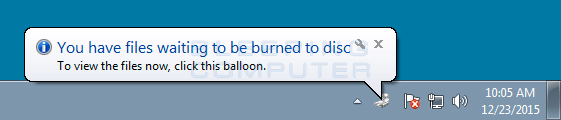

Now you may be wondering what any of this has to do with ransomware? Well the temporary burn folder contains a file called desktop.ini that is present even when you are not burning files to a disc. If a ransomware targets .ini files it will encrypt it when it scans your drive for files. Windows will then notice the change in the file, think you dragged a file in there to be burned, and issue the above alert. Another method that ransomware may trigger this alert is when the infection drops ransom notes in every folder that they scan. This too would trigger the alert because Windows will notice that the folder has been changed.
You can see an example of an encrypted desktop.ini file from the Gomasom ransomware in the image below.
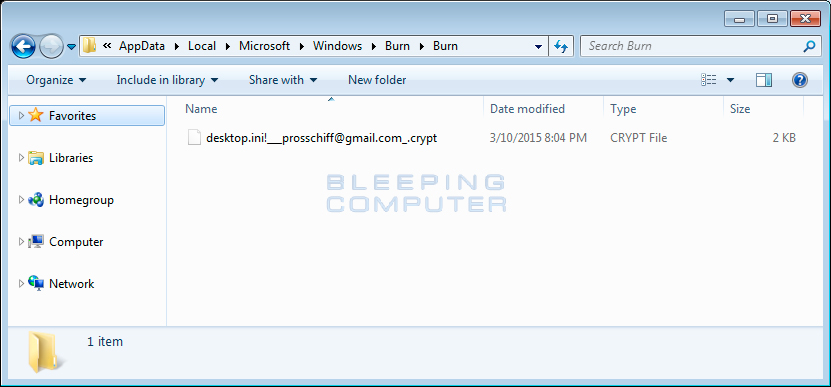
Unfortunately, this tip will not protect you from ransomware and only alert you off that a ransomware may be present on your computer. In my tests some of the ransomware that have caused this alert to appear include TeslaCrypt, Gomasom, Chimera, and the Fulba Ransomware. If a ransomware does not touch .ini files or create ransom notes everywhere, this tip will not help.
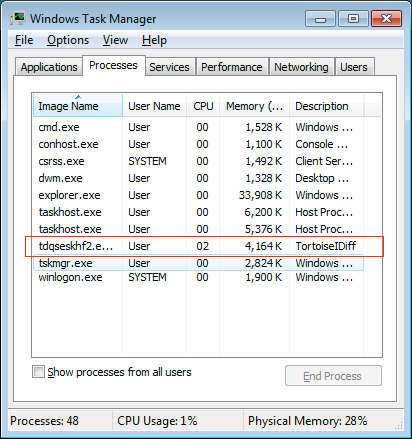
If you are using your computer and out of nowhere the alert alert described above appears, you should immediately open the Windows Task Manager and look for suspicious processes. In Task Manager look for random named processes or legitimate Windows processes like explorer.exe and svchost.exe running in 32 bit mode as shown below. If you find these processes, terminate them so that you can prevent further encryption of your data files.
 |
 |
Now, this is not to say that any time you see this alert you should panic thinking you have ransomware. It does, though, mean that you should immediately investigate what is running on your computer and not ignore it.

Break down IAM silos like Bitpanda, KnowBe4, and PathAI
Broken IAM isn't just an IT problem - the impact ripples across your whole business.
This practical guide covers why traditional IAM practices fail to keep up with modern demands, examples of what "good" IAM looks like, and a simple checklist for building a scalable strategy.






Comments
dannyboy950 - 9 years ago
I recently saw that files waiting to be writen notice on my earlier installation of win 10.
Since this computer does not even have a cd/dvd drive big red flag to me.
Opened task manager and there were 2 unknown processes running that I did not recognise. Ended task on both nothing else happened though.
May or may not have been because of the same thing.
Nice article by the way.
Dannyboy950
dbsmith77 - 9 years ago
Wouldn't it be prudent when one sees this to first disconnect their internet access before investigating?
As I understand them to work, each ransomware must communicate with its home server in order to transmit the decryption key before completing the infection process. So I would assume disconnecting from the internet would (1) disrupt this part of the process and (2) preserve the encryption key on the local machine so that recovery is possible.
Lawrence Abrams - 9 years ago
You may preserve the public encryption key, but the private key is usually not sent down to the machine in the first place. On some ransomware, the private key is generated there and you may get lucky, but killing the process or disconnecting the internet achieves the same thing. Whichever is faster for you.
vilhavekktesla - 9 years ago
Hi, thanks for the article. I agree, I would have reacted on this, but again, not all will.
Do you think installing an action monitoring software (I don't know about any decent one as of now) that monitors lots of aspects on the computer would help? All run-locations in registry, all startup locations, tasks-locations etc. As I see it the more coplicated windows becomes, the harder it is to know what is legitimate and what is not. W2k, XP are seemingly not complicated, but, vista, win8, win10 and win7 have a huge range of scheduled tasks running, and not all are to obvious unless examined. Also firewall-rules detecting strange traffic... I realise this will create a lot of false positives for the uneducated users but teaching a user how to react and then having the neccesary tool could help. I also realise this would just make the virusmakers more clever the next time to circumvent this thing.
I also realise I'm pretty secure since I am a bit paranoid, an I have disabled .js on internet, mostly run FF in a sandbox, monitor active tasks (as I believe the tasks have to run in order to download malware and do illegitimate operations. ) All the windows weasures like UAC etc seem to not prevent theese problems so I think they are inadequate and just annoying.
It look like these things just have to happen and that som need to be the victim fore everyone else to learn and survive... But, again educatiion is really essential and safe "browsing" is essential. I have not asked the user if the above things happened when they got attaced by Tesla, but probably it did. I guess the answer will be, I don't know if it happened... The did not see files on their desktop was encrypted, and I did not examine the extension at first so I thought the hade saved their emails on the desktop, so, if I had had a monitoring tool, that would certainly have been installed on the computer and it would have allerted them and me about it. The computer was fully updated, flash, no adobe, FF, not using IE, all windows updates etc, so I do not know what the user could have done different other than having a more recent backup. I was able to decryp 34 000 files because of this site and I and them are very grateful to that, and this time it was only the Tesla, so we won this time, nex time... Wehll at least this users have learned the importance of beackups, and I'm still looking for a more reliable solution than fully updated antivirus which never the less misses the threath.