


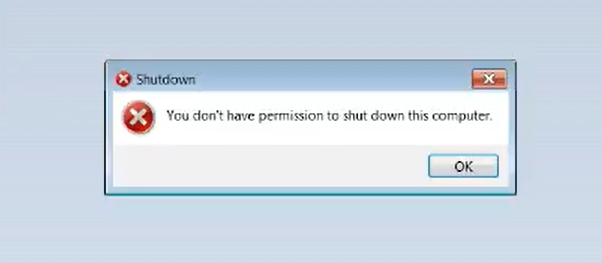
A "You don’t have permission to shut down this computer." error is preventing Windows 7 from shutting down or restarting their computers according to user reports that came in during the last 24 hours.
"This happened to a couple of our machines today. I looked it up and it seems that in the past 24 hours this is becoming widespread," a Bleeping Computer reader told us.
There are already more than 100 posts in this Reddit thread with another 50+ in this one, with more being added every minute.

The Microsoft Answers forums and Twitter are also filled with Windows 7 users reporting encountering the error when trying to shut down their devices.
Microsoft hasn't confirmed this issue but users have several theories, including problems caused by broken User Account Control group policies, the latest Windows 7 Monthly Rollup updates, or telemetry updates acting out.
How to fix the issue
Even though Microsoft hasn't yet acknowledged this problem, a solution from Quick Heal confirmed by multiple users (1, 2, 3) says that the following steps can be used to fix the error so that you can turn off your Windows 7 device again (only works for users of Professional, Ultimate, or Enterprise versions):
1. Open the Run dialog by hitting the Windows+R combo, type gpedit.msc and hit OK.
2. Go to Computer Settings > Windows Settings > Security Settings > Local Policies > Security Options
3. Search User Account Control: Run all administrators in Admin approval and set it to ENABLE
4. Open Run again and do a gpupdate /force
5. Restart the system by opening the Run dialog again, type shutdown -r and hit OK
If you can't turn off after the gpupdate, then kill and rerun Explorer.exe from the Run dialog
Some people also claim that this issue is being caused by a recent Adobe update and that disabling their Windows services will fix the problem.
The services people state should be disabled are "Adobe Genuine Monitor Service", "Adobe Genuine Software Integrity Service", and "Adobe Update".
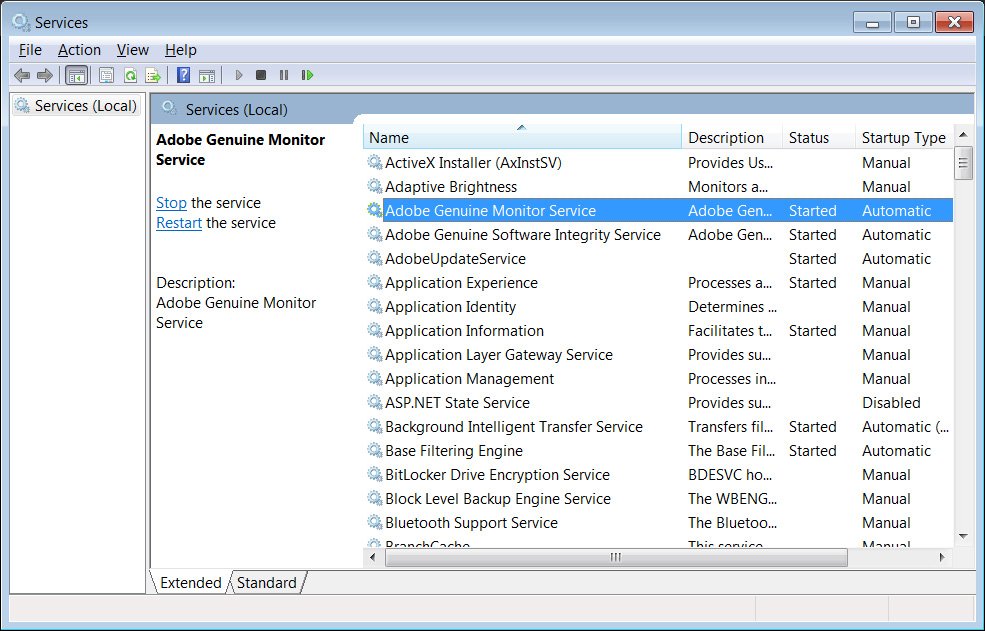
BleepingComputer has not been able to reproduce this issue on a Windows 7 PC with Adobe products installed and can not confirm if disabling the services will fix the issue.
Workarounds are also available
For users who find that the above doesn't work, the following workaround can be used to bypass the error temporarily.
"I had the same thing happen to my genuine Windows 7 OS last night. I deleted Admin profile, re-created it, migrated profiles but every attempt has been unsuccessful so far," one Reddit user said.
"I had to create another admin account, log into it and then log back to my default admin account which enabled me to normally shut down/restart the system. This isn't a solution tho, just a workaround."
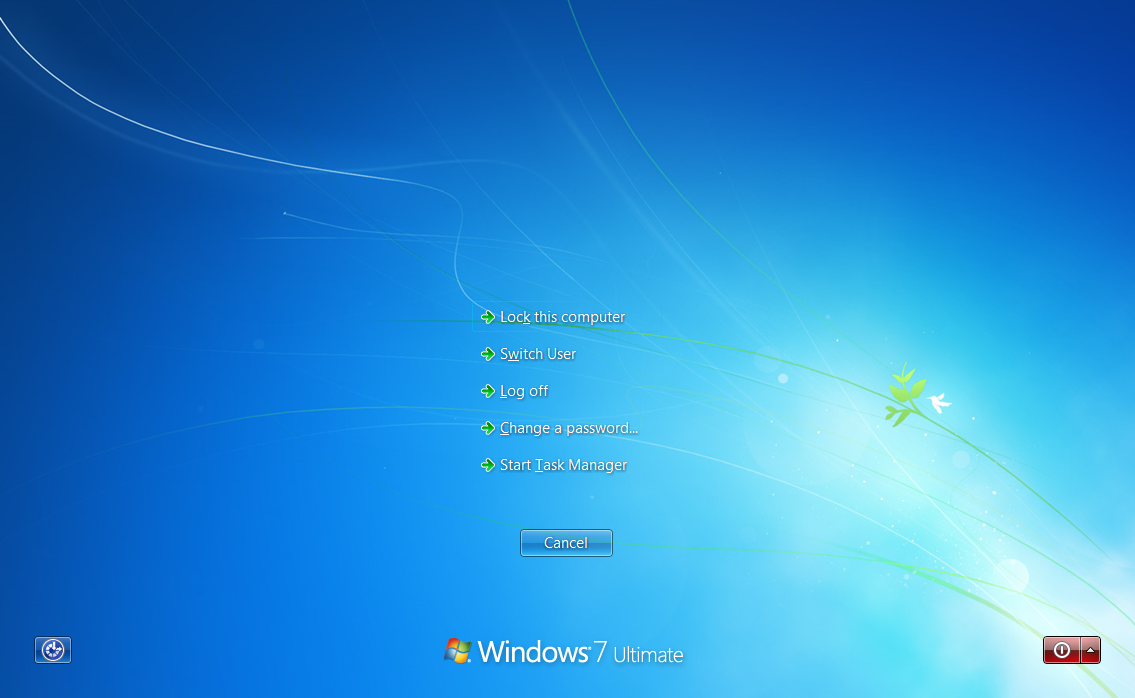
Other reports say (1, 2) that the affected Windows 7 devices can be shut down or restarted by hitting CTL+ALT+DEL and clicking the red icon in the lower right-hand corner of the screen.
BleepingComputer asked a Microsoft spokesperson for comment and was told that they are investigating the issue.
“We are aware of some Windows 7 customers reporting that they are unable to shut down without first logging off and are actively investigating”, a Microsoft spokesperson told BleepingComputer.
Update 2/8/20: Added statement from Microsoft and information about Adobe services.
H/T Chuck

Break down IAM silos like Bitpanda, KnowBe4, and PathAI
Broken IAM isn't just an IT problem - the impact ripples across your whole business.
This practical guide covers why traditional IAM practices fail to keep up with modern demands, examples of what "good" IAM looks like, and a simple checklist for building a scalable strategy.






Comments
RatMan29 - 5 years ago
What happens if I use the old tried-and-true method of pulling the plug?
serghei - 5 years ago
You might lose some data. Or not.
HeidiSalami - 5 years ago
Probably nothing. Win7 is pretty robust in that regard. Maybe there is a tiny probability for an error that can be fixed by windows itself at startup.
deanna0 - 5 years ago
I just tried the CTRL+ALT+DEL and clicking the red icon in the lower right-hand corner of the screen.
It did work, and I am back on line, I started thinking maybe I couldn't get back, lol... Maybe I will just leave it on..
eq2675 - 5 years ago
Thank you for the fix. Wife’s corporate W7 Pro had this problem today. Luckily she had local admin rights.
Blvmodels - 5 years ago
The method above worked, but based a different Reddit article we found adobe was the cause in our case. Here's what worked on about 10 users we had:
Run services.MSC.
Stop the three Adobe services.
Set them for disable.
Close everything.
Log off and restart.
It seemed less scary than messing with uac and admin rights.
pcpunk - 5 years ago
Was Flash Player Up To Date? Just curious as I'm not having this issue with Up To Date Flash.
Guenter_Born - 5 years ago
"The method above worked, but based a different Reddit article we found adobe was the cause in our case. Here's what worked on about 10 users we had:
Run services.MSC.
Stop the three Adobe services.
Set them for disable.
Close everything.
Log off and restart.
It seemed less scary than messing with uac and admin rights."
----
Thx, it seems you proved my suspicion I outlined here: https://borncity.com/win/2020/02/08/windows7-prevents-shutdown-restart-feb-2020/
mauromoraes - 5 years ago
"The method above worked, but based a different Reddit article we found adobe was the cause in our case. Here's what worked on about 10 users we had:
Run services.MSC.
Stop the three Adobe services.
Set them for disable.
Close everything.
Log off and restart.
It seemed less scary than messing with uac and admin rights."
Same here. After disable the Adobe services, shutdown is working again!
GT500 - 5 years ago
Microsoft break this in their patch for the black desktop background issue?
Guenter_Born - 5 years ago
"Microsoft break this in their patch for the black desktop background issue?"
I guess the answer is no - see my comment above. The issue has been reported, before the black desktop patch KB4539602 / KB4539601 came out, I guess.
cjgiam - 5 years ago
It should be noted that the Group Policy Editor does not exist in Windows 7 Home, so the solution in this article won't work. You have to try one of the workarounds or manually edit the registry thru regedit
Guenter_Born - 5 years ago
"It should be noted that the Group Policy Editor does not exist in Windows 7 Home, so the solution in this article won't work. You have to try one of the workarounds or manually edit the registry thru regedit"
Yes, that's true - also the Windows+R thing only works under an admin account.
I've outlined the steps to use gpedit.msc and linked also a reference to change the registry entries with regedit at:
https://borncity.com/win/2020/02/08/windows7-prevents-shutdown-restart-feb-2020/
But I would say: Check the Adobe Service first, before you tamper with permission settings for UAC.
cjgiam - 5 years ago
Good info. Thank you for including your input & the link.
AutographsToYou - 5 years ago
This hack worked! THANK YOU SO MUCH. I love you guys!!!!!
JohnC_21 - 5 years ago
I wonder if forcing a shutdown using an elevated command prompt in the Home version would work.
shutdown /f /s t=0
SuperSapien64 - 5 years ago
I'm so glad I don't have Windows 7 anymore.
pcpunk - 5 years ago
I wonder what the common theme is that is causing this. I don't have it...yet...hopefully not at all!
rvalens2 - 5 years ago
I tried both the main fix listed above and the Adobe fix, but neither worked for me. However, happily, I was able to get it to work after I made a few changes to it. Here they are.
1. Open the RUN dialog by pressing WINDOWS+R.
2. Type GPEDIT.MSC and press OK.
(My PC encountered an error while parsing — which I ignored. Just click on OK to close the error window.)
3. Under COMPUTER CONFIGURATION in the left panel, open the following folders one by one:
WINDOW SETTINGS
SECURITY SETTINGS
LOCAL POLICIES
SECURITY OPTIONS
Then, in the right panel of the SECURITY OPTIONS folder, scroll down the list until you find:
USER ACCOUNT CONTROL: RUN ALL ADMINISTRATORS IN ADMIN APPROVAL MODE
4. RIGHT-CLICK on it and select PROPERTIES. In the window that pops up, set the option button to ENABLED. Click OK and then close the LOCAL GROUP POLICY EDITOR window.
5. Open RUN again and type GPUPDATE /FORCE and press ENTER. The process will open a window and automatically complete the process.
6. (Step Five, from the main fix listed above, did not work for me. So this is where I changed it.)
7. Start the TASK MANAGER by pressing and holding the CTRL+ALT+DEL buttons.
8. In the TASK MANAGER window under the PROCESSES TAB, find EXPLORER.EXE and terminate the process by selecting it and clicking on END PROCESS. A second window will then pop-up, click on END PROCESS once more to end it.
9. Your screen will now go black except for the TASK MANAGER and your background image. (Don't worry about it.)
10. Close the TASK MANAGER window.
11. Now press and hold the POWER ON/OFF button on your PC until Windows 7 starts the shutdown procedure. Once it starts, release the button. Windows will automatically complete the shutdown process.
12. Reboot your PC. Wait for it to complete its reboot and then try shutting down the computer. You should now be able to turn it off without encountering the error.
This fix worked for me, hopefully, it will also work for you.
FYI, my PC runs Windows 7 Professional and has had all of its security updates.
rvalens2 - 5 years ago
"Other reports say (1, 2) that the affected Windows 7 devices can be shut down or restarted by hitting CTL+ALT+DEL and clicking the red icon in the lower right-hand corner of the screen." - Bleeping Computer
I thought I would add that although the above information did allow me to shut down my PC. It did not permanently fix the problem. The next time I booted up my PC, it generated the same error when I tried to shut it down. Only the longer procedure (listed above) eliminated the error for me.
DSperber - 5 years ago
THE PROBLEM IS BITDEFENDER!!!
Uninstalling BitDefender Total Security 2020 makes all symptoms disappear. The GPEDIT "fix" is not needed, and the original "disabled" value for that UAC value can be restored.
Reinstalling BitDefender makes all the symptoms reappear.
I have opened a thread on the BitDefender forum, and alerted them to this worldwide RED FLAG SITUATION affecting all Win7 users and caused by what clearly is a very recently pushed out update (around Feb 6).
Obviously they have somehow broken how UAC works in Win7.
tomthegeek - 5 years ago
while bitdefender may be affected, it's most certainly NOT caused by it. I'm in a domain environment, no bit defender at all (sophos), annnndddddd it's hitting windows 10 1903 machines as well. It's doing something very weird with the user security as well: sysinternals proc mon wouldn't run at all-says you have to be a member of the admin group (I'm not only admin on machine, but in the domain as well!!), sysinternals procexp was acting like it was run as limited user (with access denied on some paths). 1102w printers acting up. Profx Engagement and office 365 having issues/crashes. what a s**t show. I've seen UAC settings, I've seen adobe get blamed. does anyone have the definite answer yet?
DSperber - 5 years ago
According to a recent post on Microsoft Answers Community forum:
PaulSey...
Microsoft Employee|
Forum Owner
“We’ve identified and resolved the issue, which was related to a recent Adobe Genuine update that impacted a small number of Windows 7 users. Adobe has fully rolled back the update automatically for all impacted customers. No action is needed by customers. If you are still experiencing the issue, it will be resolved shortly via an automatic update"
We shall see if this is truly the fix.
This suggests that NOTHING IS NEEDED FOR USERS TO DO (other than perhaps roll back any temporary "fixes" they might have applied, e.g. the GPEDIT change for the UAC adminstrative approval item, changing programs to "run as Administrator", etc.)? In other words perhaps just return to the way things looked on your Win7 system on about Feb 5, Adobe rolls back their damaging update overnight, and by tomorrow at the latest everything is back to normal? Case closed?
I wasn't aware that Adobe was quietly pushing out their own software updates (e.g. to Adobe Genuine services running in the background and now accused of being responsible for this worldwide debacle) without us users knowing about it, but I guess we now know this is going on. Perhaps I shouldn't be totally surprised?? I mean at least updates to Flash Player require our acknowledging and permission to apply, and thus the ability to prevent these updates if we wanted to. Of course we usually trust software vendors, so how are we to know it could cause something like this?
So, is it only Win7 users who were affected? What about Win10? Don't they also have Adobe Genuine services running there? No impact for Win10? There were some reports of unusual administrator-related anomalies occurring very recently, but perhaps just random noise.
Did it impact anything else, e.g. Macrium Reflect image backups and VSS malfunctions strangely occurring around Feb 7, but not on Feb 6?? Reports of that too.
We shall see what settles out over the next few days.
fcsnc - 5 years ago
Breaking news: I am running Windows 7 Home Premium on a laptop, and started experiencing this issue ("You don't have permission to shut down this computer.") after the January Patch Tuesday updates. You can't run gpedit on Home Premium, just Professional. So I have been using the ctrl-alt-del method of shutting down.
Yesterday, out of the blue, I received a Windows Automatic Update. There was only one update to install: the ubiquitous "Windows Malicious Software Removal Tool x64." After that was installed and I rebooted, the "You don't have permission" bug/feature/whatever issue was gone. There was no helpful information in mrt.log, just that the tool ran successfully and no malware was found--as usual.
Obviously Microsoft fixed the issue with that one update, but did not bother to document or announce that they were doing that.
P.S.: I haven't received any Adobe updates at all in recent weeks, and I have to agree with DSperber's implication that Microsoft always tries (in vain, as far as I'm concerned) to blame issues with its own operating system on other vendors. This cavalier attitude persists with Windows 10 and all of its "update" disasters as well.
DSperber - 5 years ago
I believe it was your re-boot which caused Adobe update to back out the previously destructive 2/3/2020 updates for Adobe Genuine Serves, and reinstall the previous 10/8/2019 version of that software. The re-boot and backed-out Adobe software which is what resulted in the "cannot shutdown" disappearing for you, not the January Windows Update just installed.
If you look in C:\Program Files (x86)\Common Files\Adobe\ you will see the dates on Adobe Genuine components, now back to 10/8/2019.